How to Make a Profit and Loss Statement in Google Sheets
Looking for a tool?
A profit and loss statement shows revenue minus expenses over a period, ending in one number:
net profit. In Google Sheets you do not type that number — you compute it. On the free template below,
a real quarter of a solo service business reads $8,240.00 in revenue, $1,044.59 in expenses and
$7,195.41 of net profit — an 87.3% margin, and every one of those figures is a
SUMIFS over two logs, not a number anybody keyed in. This page builds that statement
row by row, shows the real month-by-month output, and explains what to do with the answer.
What a profit and loss statement actually is
A P&L answers one question: over this month, quarter or year, did the business make money, and where did it go? It is not a bank balance — that is a snapshot of cash right now, and it includes money that is not yours (tax you owe) and excludes money that is (an invoice not yet paid). It is not a balance sheet either, which lists what you own against what you owe on a single date. The P&L covers a period. It is the scoreboard for how the business performed, and it is the statement your accountant, your lender and your own pricing decisions all run on.
It is also the only financial statement most solo businesses genuinely need. If you have no payroll, no inventory and no accrual accounting, the P&L plus a bank statement is the whole picture.
The structure, top to bottom
| Line | What it is |
|---|---|
| Revenue (income) | All money earned from sales or services in the period |
| − Cost of goods sold (direct costs) | Materials, product cost, subcontractors — costs tied directly to the work |
| = Gross profit | What is left after the direct cost of delivering |
| − Operating expenses | Overhead: software, advertising, insurance, fees, office, travel, licences |
| = Net profit | The bottom line — your actual profit for the period |
A service business with few direct costs can skip the COGS section entirely and run revenue straight into operating expenses. The bottom line is identical; you just lose the gross-margin line, which for a business selling its own time was never very informative anyway. If you do sell physical goods, keep the split: the gross profit calculator shows why that one line is the most diagnostic number on the page.
Build it in Google Sheets, step by step
You need two tabs feeding one summary. The two-log bookkeeping setup is the whole prerequisite: an Income tab with date and amount, and an Expenses tab with date, category and amount. Then, on a third tab:
- Revenue:
=SUM(Income!F:F)for the whole period, or the month-aware version below. - Cost of goods sold: total your direct-cost categories, e.g.
=SUMIF(Expenses!$D:$D,"Supplies",Expenses!$F:$F). - Gross profit: point at the two cells —
=C6-C7, not a retyped number. - Operating expenses:
=SUM()across your overhead category totals. - Net profit:
=Gross profit - Operating expenses.
Five formulas, and the statement is finished. Because each one points at the logs rather than at a typed figure, it re-states itself the moment you record a sale or a receipt. That is the entire advantage of doing this in a spreadsheet rather than in a document.
Add monthly columns — the version worth building
A single-period P&L tells you one thing. A P&L with a row per month tells you the direction, which
is the part you can act on. Put the first day of each month down a column, then make the totals month-aware
with SUMIFS and EOMONTH:
=SUMIFS(Income!$F$2:$F$401,Income!$A$2:$A$401,">="&$B13,Income!$A$2:$A$401,"<="&EOMONTH($B13,0))
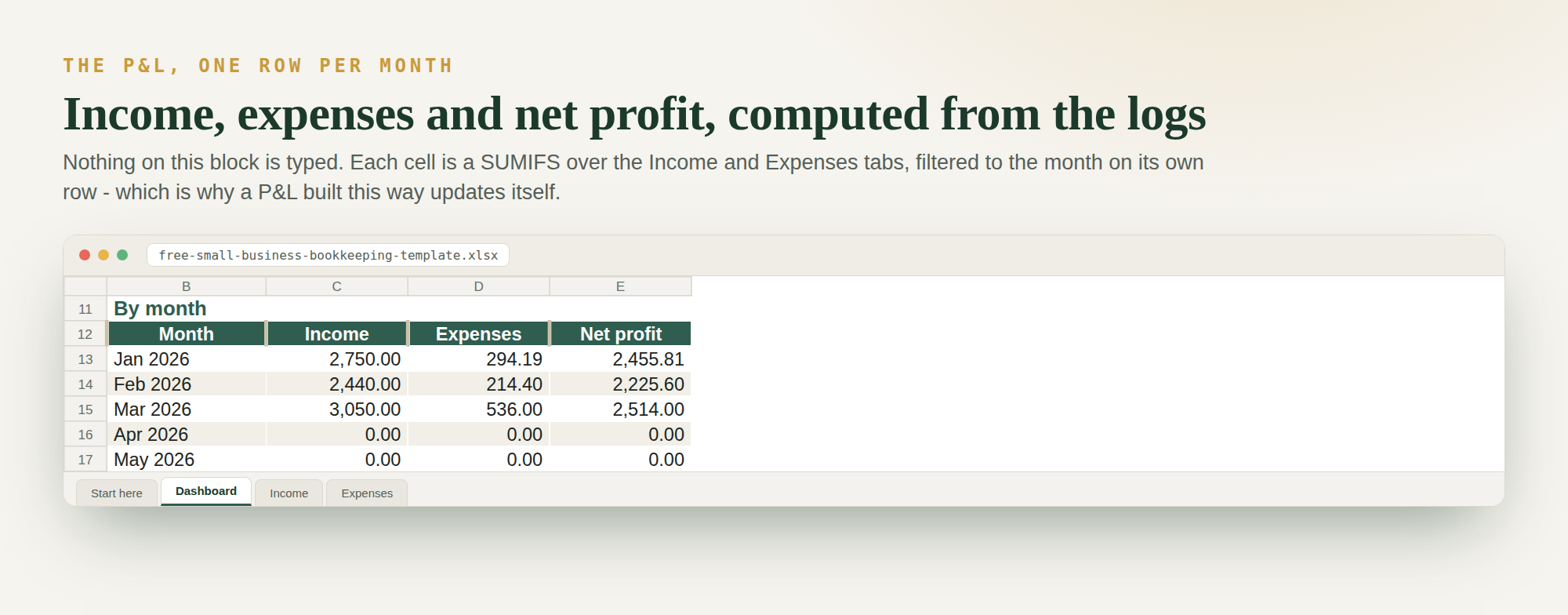
Copy the same formula against the Expenses tab for the cost column, subtract one from the other for net profit, and fill down twelve rows. That is the block in the screenshot below, taken from the free template.
A worked quarter, on real ledger figures
The numbers below are not illustrative. They are what the free bookkeeping template computes from its sample ledger — six client payments and eight business costs across the first quarter of the year.
| Month | Revenue | Expenses | Net profit | Margin |
|---|---|---|---|---|
| January | $2,750.00 | $294.19 | $2,455.81 | 89.3% |
| February | $2,440.00 | $214.40 | $2,225.60 | 91.2% |
| March | $3,050.00 | $536.00 | $2,514.00 | 82.4% |
| Q1 total | $8,240.00 | $1,044.59 | $7,195.41 | 87.3% |
Three things fall out of that table that a bank balance would never have shown you.
March was the best revenue month and the worst margin month. Revenue rose from $2,440 to $3,050, but expenses rose from $214.40 to $536.00 — mostly a $320 legal fee and $216 of annual hosting. Net profit barely moved, from $2,225.60 to $2,514.00, and margin fell nearly nine points. Revenue going up and margin going down at the same time is the single most common pattern a monthly P&L catches early.
One recurring client is most of the business. Three of the six payments are the same $1,800 retainer, which is $5,400 of the $8,240 — 65.5% of the quarter from one client. That is a concentration risk sitting in plain sight on the income log, and it is the reason the log has a “received from” column at all.
Deductible is not the same as spent. The template totals $1,044.59 of expenses but only $1,020.59 of deductible expense, because the one meal on the ledger — a $48.00 client lunch — is 50% deductible, so $24.00 of real money never reaches the tax return. Your P&L should show what you spent; your tax figure uses the deductible column. Getting the expense categories right is what keeps those two numbers separable.
And the number that decides what you can actually take home: self-employment tax on that $7,195.41 is 7,195.41 × 0.9235 × 0.153 = $1,016.68, or about 14.1% of net profit, before any income tax at all. Net profit is the base for your tax set-aside, never revenue — setting aside a percentage of the $8,240 would have you saving against money that was never yours. Run your own figures through the self-employed tax calculator rather than assuming the rate.
How to read the statement once it exists
- Gross margin (gross profit ÷ revenue) says whether your pricing covers the cost of delivering. A thin margin here means you are underpricing or overpaying for materials, and no amount of overhead discipline fixes it.
- Net margin says whether the business, as a whole, works. High revenue with a low net margin means overhead is eating the business; the fix is in the expense column, not the sales pipeline.
- The trend beats the level. One month at 82% tells you little. Three months falling from 91% to 82% tells you to look at March's invoices.
For the full reading method — which number to check first, what a healthy margin looks like by industry, the six red flags, and why your own unpaid labour never appears anywhere on the page — see how to read a profit and loss statement.
The mistakes people actually make
- Counting invoiced-but-unpaid work as revenue. On cash-basis books, revenue is recorded when the money arrives. Count the invoice and your profit is a forecast wearing a statement's clothes.
- Typing the totals instead of pointing at the logs. A hard-coded $8,240 is correct for about a day. Every number on a P&L should be a formula with a visible source.
- Lumping direct costs in with overhead. Once they are mixed you cannot see gross margin, and gross margin is the line that tells you whether the work itself is priced right.
- Netting fees off revenue. A $1,800 payment that arrives as $1,747 after processing fees should be logged as $1,800 revenue and a $53 expense. Netting hides a real, recurring cost.
- Reading the margin without the months. The quarter above averages 87.3%, which conceals a nine-point slide. Averages are where problems go to hide.
- Doing it once a year. A P&L produced in April for last year is a history lesson. One produced on the first of each month is a steering wheel.
Quick FAQ
What is the difference between a P&L and a balance sheet?
A profit and loss statement covers a period and shows revenue minus expenses — did you make money this month? A balance sheet is a snapshot of a single date showing what you own against what you owe. Most small businesses live by the P&L and only produce a balance sheet when a lender asks.
Can I make a profit and loss statement in Google Sheets for free?
Yes. Google Sheets is free and a P&L needs only SUM, SUMIFS and
EOMONTH. The quarter worked through above was produced by exactly those formulas. You do not
need accounting software until you have payroll, inventory or accrual accounting.
How often should I update my profit and loss statement?
Monthly, on the first working day of the new month. If income and expenses are logged as they happen the statement is already finished — updating it is a five-minute read, not a rebuild.
Does net profit mean I can take that money out of the business?
No. Net profit is before tax and before anything you have already spent on non-deductible items. On the worked quarter, $1,016.68 of the $7,195.41 is self-employment tax alone. Pair the P&L with cash flow tracking so you are watching timing as well as profit.
Do I need accounting software for a profit and loss statement?
Not for most solo and micro businesses. A spreadsheet P&L is free, transparent — every figure traces back to a logged row — and gives your accountant a clean record. Software earns its place when the business gets genuinely complex, not before.
Keep going: set up the logs that feed this in a small business income and expenses spreadsheet, learn the underlying bookkeeping setup, and download the free template the worked quarter above came from.