Small Business Bookkeeping in Google Sheets (Free Template)
Looking for a tool?
To do bookkeeping in Google Sheets — for your own business or for clients — set up two tabs (Income and Expenses), tag every expense to one of 8–12 categories with a dropdown, use SUM and SUMIF on a Dashboard tab to get live totals and profit, and reconcile against your bank statement once a month. That is the whole system. Everything below is the detail: the exact columns, the formulas including a monthly profit grid, a worked month with real numbers, the reconciliation step most spreadsheet guides skip, how to run it for clients, and an honest account of where Sheets stops being enough.
Free download · no email · no signup
Take the finished template instead of building it
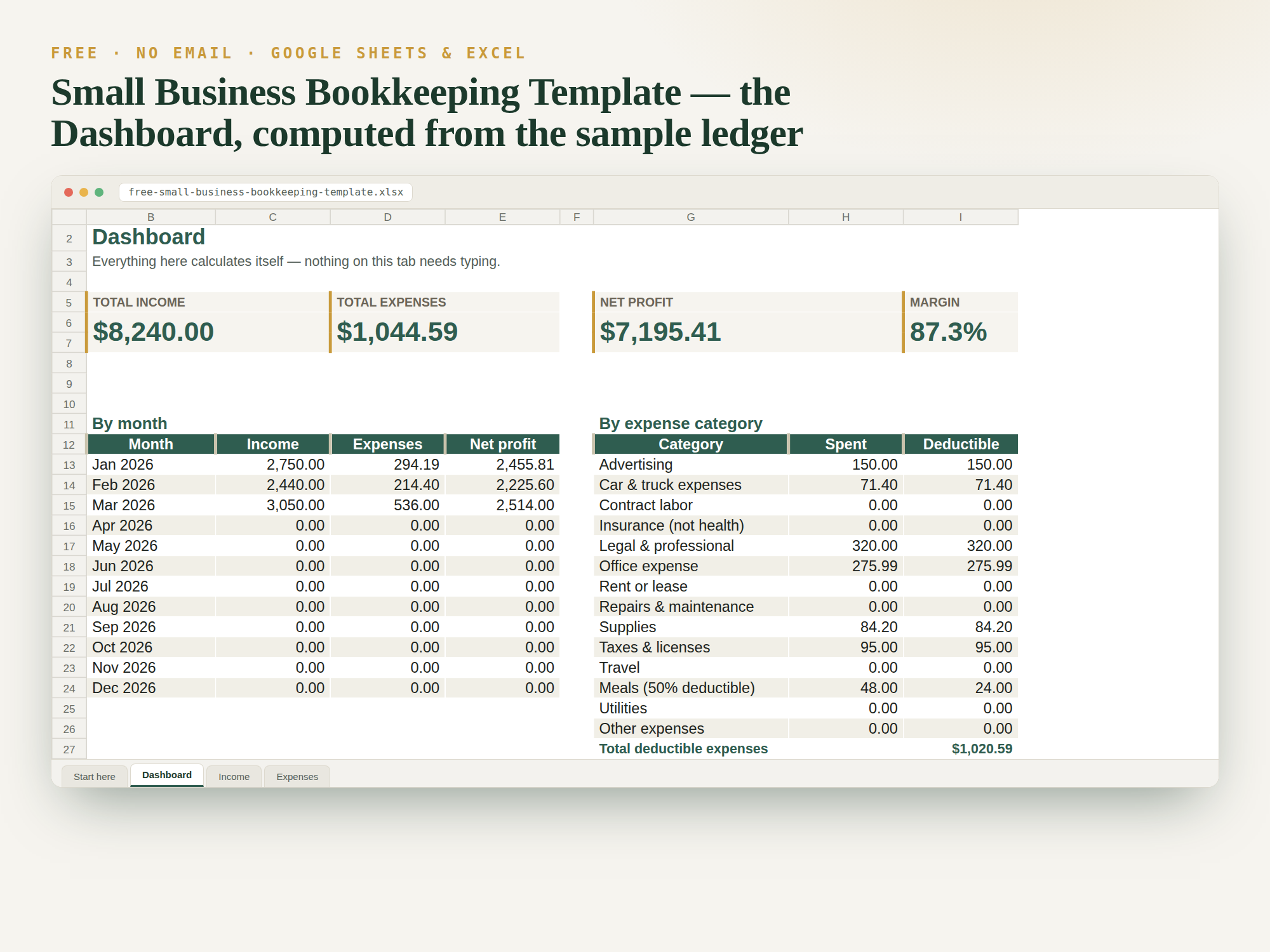
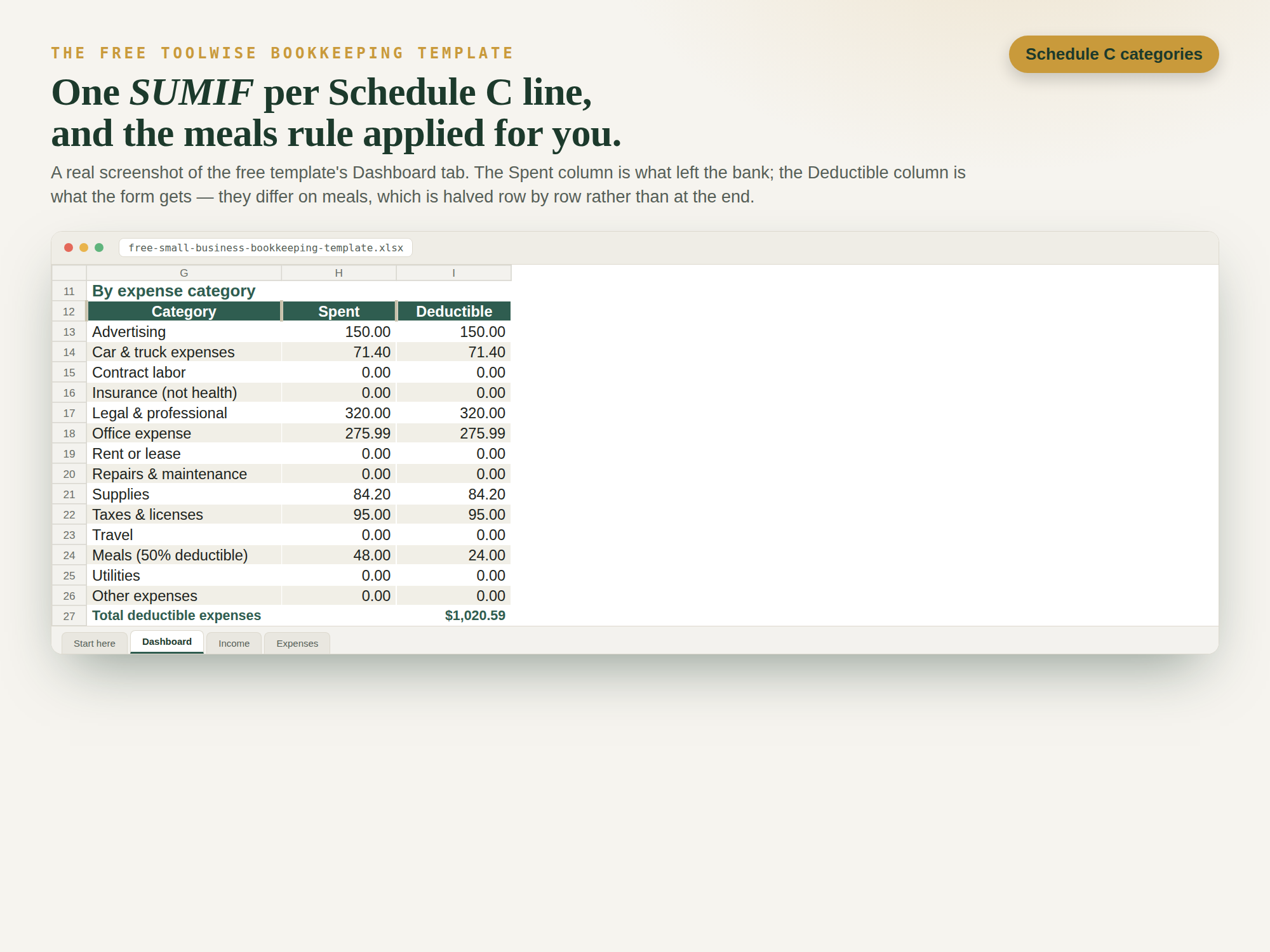
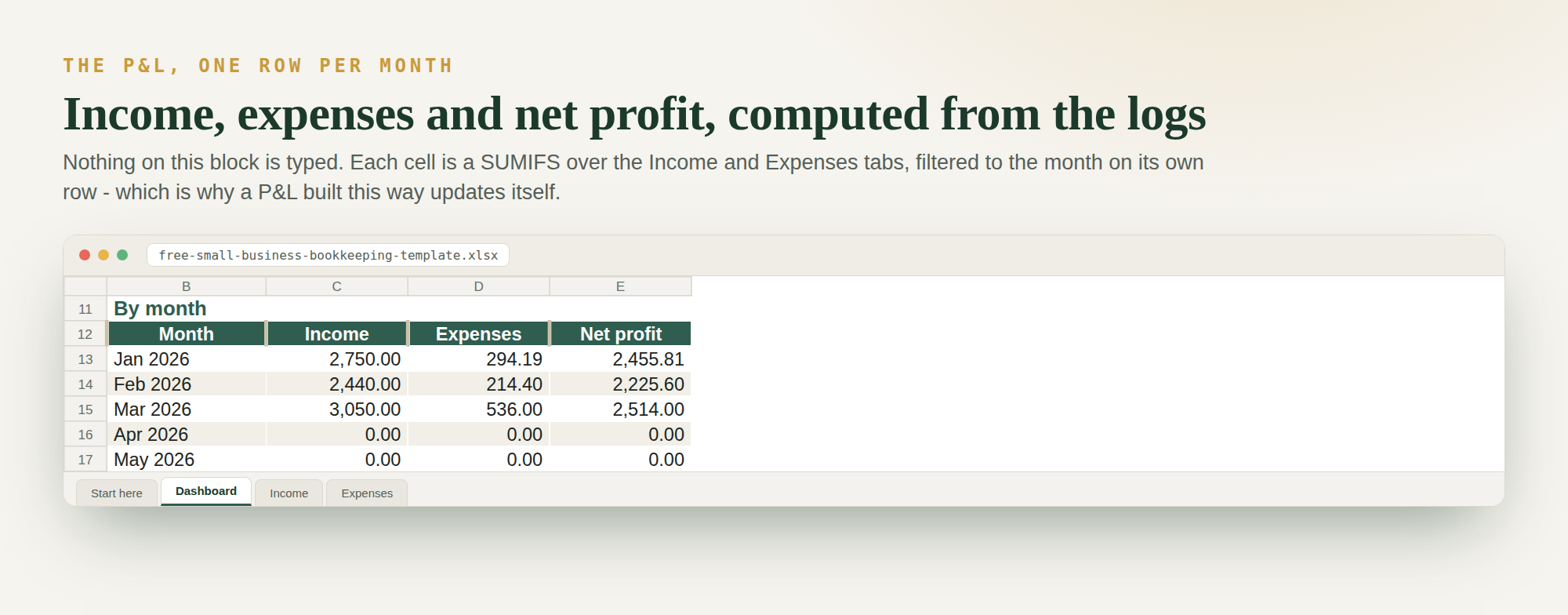
Everything described on this page, already built: an Income log, an Expenses log with the fourteen IRS Schedule C categories on a dropdown, and a Dashboard that totals income, expenses, net profit and margin, breaks spending down by month and by category, and applies the 50% meals rule for you. Works in Google Sheets and Excel.
Download the free template (.xlsx) What's inside, with a worked example
To open it in Google Sheets: File → Import → Upload, then choose Replace spreadsheet. Every formula in it is machine-verified against hand-worked figures before release — 28 checks, listed on the file's own Start here tab.
What's in the template, at a glance
| Tab | What it does | What you type |
|---|---|---|
| Start here | How to use it, the Google Sheets import steps, and every formula written out | Nothing |
| Dashboard | Income, expenses, net profit and margin; totals by month and by Schedule C category; deductible total with the 50% meals rule applied | Nothing — it all calculates |
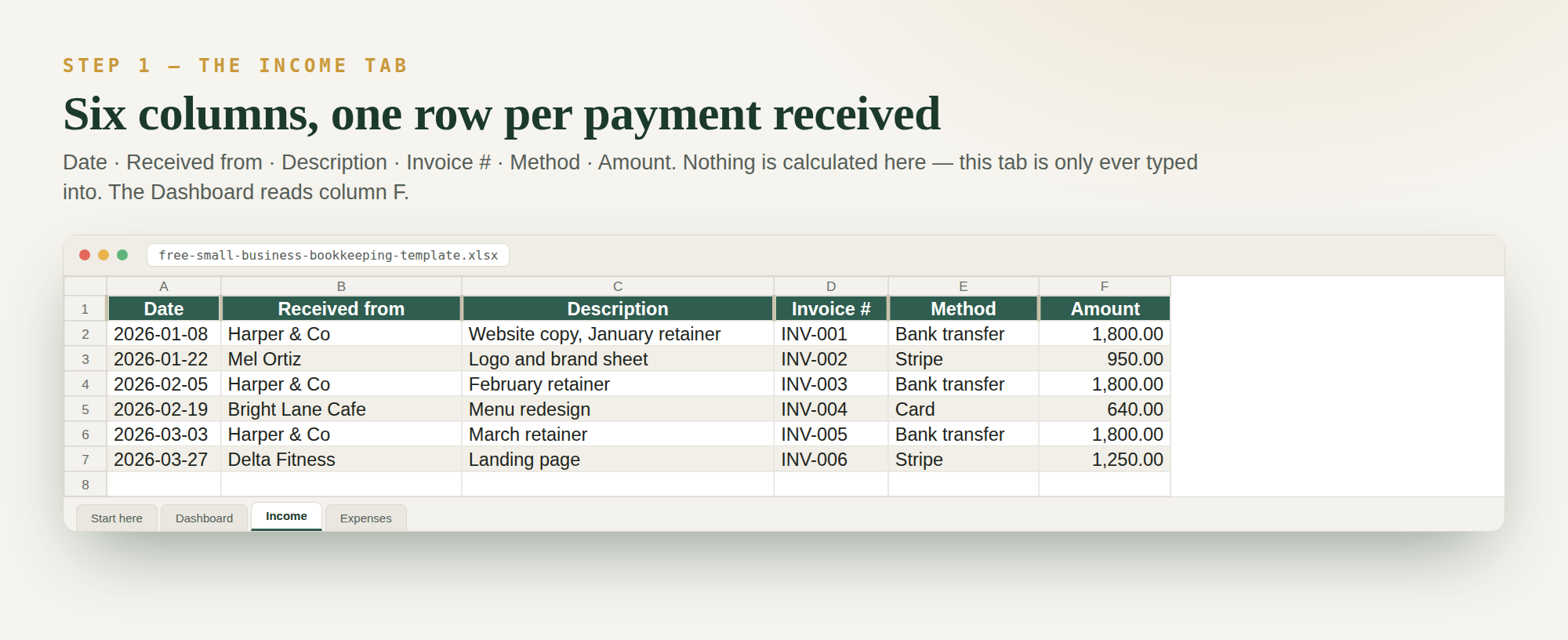
| Income | 400 rows: date, who paid you, description, invoice number, method, amount | One row per payment received |
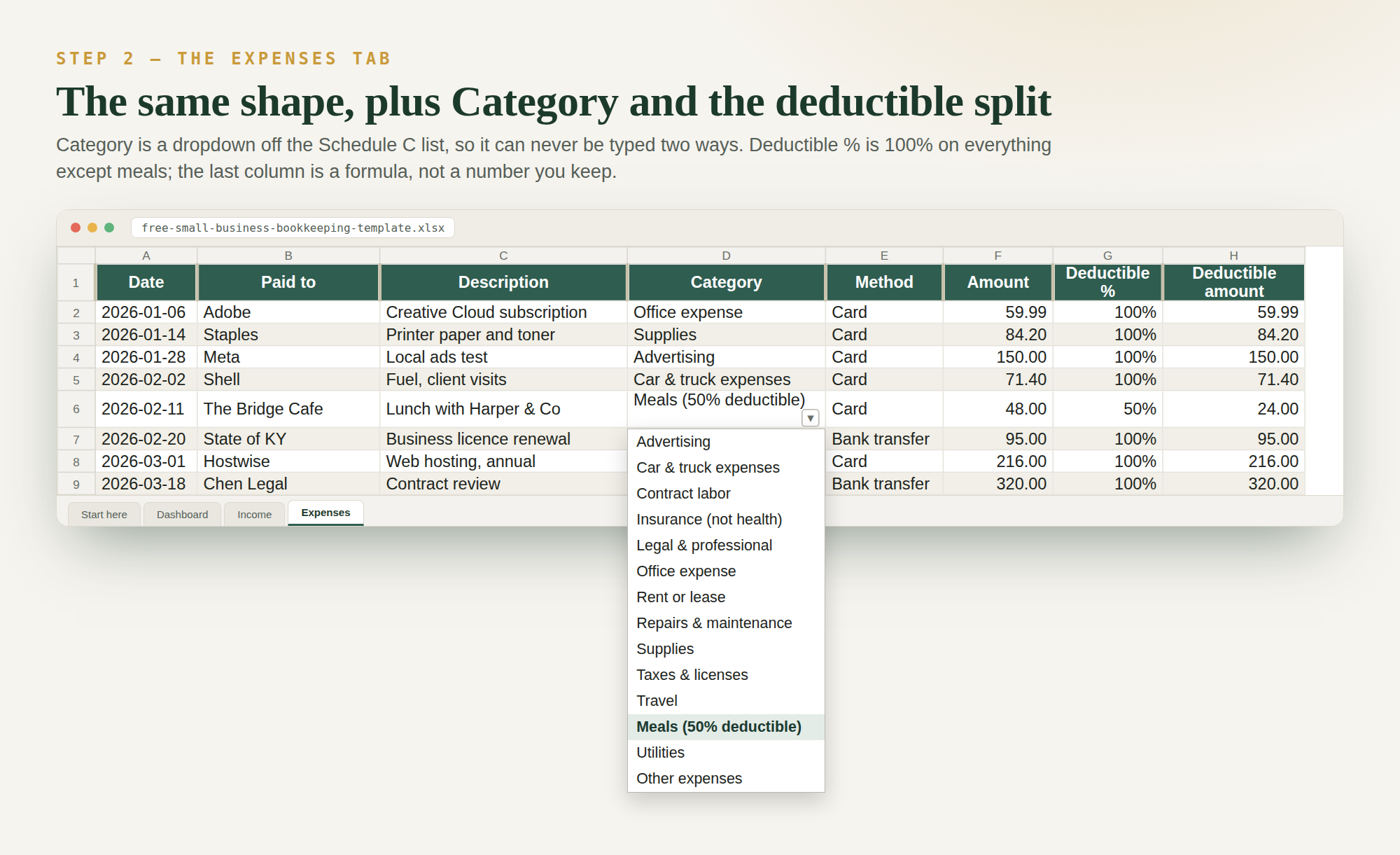
| Expenses | 400 rows, with a category dropdown and a deductible-% column | One row per purchase |
It is cash-basis: you record income when the money arrives, not when you send the invoice. That is what almost every sole proprietor uses. There is no invoicing, no payroll, no inventory and no bank feed in it — if you need those you need accounting software, not a bigger spreadsheet, and the last section of this guide says exactly where that line is.
Why a spreadsheet beats software for most small businesses
Accounting platforms are built for businesses with payroll, inventory and accrual accounting. A solo operator's books are simpler: money in, money out, categorised. A spreadsheet gives you that with no monthly fee, no learning curve and total control — and at tax time your accountant will be happier with a clean, consistent spreadsheet than with a half-configured software account nobody finished setting up.
The honest counter-case is at the bottom of this page. There is a real point where Sheets stops paying its way, and knowing where it is saves you from both mistakes: paying for software you don't need, and clinging to a spreadsheet you have outgrown.
Step 1: Set up your two logs
Create two tabs: Income and Expenses. Column letters below are used by every formula in this guide, so if you change the layout, change the formulas to match.
Income log columns
| Col | Field | Why it earns its place |
|---|---|---|
| A | Date received | When the money arrived, not when you invoiced |
| B | Client / source | Lets you see who your revenue actually depends on |
| C | Description | What the payment was for |
| D | Amount | The gross amount, before any processing fee |
| E | Method | Bank transfer, card, cash — the field that makes reconciling possible |
Expense log columns
| Col | Field | Why it earns its place |
|---|---|---|
| A | Date paid | Drives every monthly and quarterly total |
| B | Vendor | Who you paid |
| C | Description | Enough detail to justify it in an audit two years later |
| D | Amount | |
| E | Category | The important one — see Step 2 |
| F | Receipt link | Paste a Drive link. Photograph the receipt, drop it in a folder, link it |
Log the gross amount on the income side and put the processing fee in Expenses under Fees. Netting them off hides a real cost: in the worked example below, fees alone are $216.95 in a single month.
Step 2: Pick 8–12 expense categories and stop there
Too many categories is the number-one reason bookkeeping systems die. Start from this list and cut what does not apply:
| Category | Typical examples |
|---|---|
| Materials & supplies | Parts, consumables, job materials |
| Equipment & tools | Anything durable you buy to do the work |
| Vehicle | Fuel, maintenance, parking |
| Software & subscriptions | Design tools, booking apps, phone plan share |
| Insurance | Liability, equipment |
| Marketing | Ads, business cards, website |
| Professional services | Accountant, legal |
| Fees | Bank, payment processing, marketplace fees |
Use a dropdown for the category column (Data → Data validation, set to a list from a range) so every entry is consistent — a single typo like "Suplies" silently drops that row out of your category totals and the numbers still look fine.
One refinement worth the ten minutes: name your categories after the lines on the tax form you actually file. If your accountant works from Schedule C, categories that already match its lines turn year-end from a translation exercise into a copy exercise.
What the two logs look like once they are built
Both images below are screenshots of the free template at the top of this page — the real file, not a mockup — so you can see the shape before you build your own or download ours. One honest difference: the template carries an Invoice # column that the layout above does not, which pushes Amount to column F on the Income tab and F–H on Expenses. The formulas in Step 3 use the letters from the tables above; if you copy the template instead, shift the letters to match what you see here.
Step 3: The formulas that run everything
On a Dashboard tab. The first three are the whole system; the rest are the ones you will want by month two.
| What you want | Formula |
|---|---|
| Total income | =SUM(Income!D:D) |
| Total expenses | =SUM(Expenses!D:D) |
| Profit | =SUM(Income!D:D)-SUM(Expenses!D:D) |
| One category's total | =SUMIF(Expenses!E:E,"Vehicle",Expenses!D:D) |
| Every category at once | =SUMIF(Expenses!$E:$E,$A5,Expenses!$D:$D) filled down beside a list of categories in column A |
| Profit margin | =IF(B2=0,"",(B2-B3)/B2), formatted as a percentage |
| Income for one month | =SUMIFS(Income!$D:$D,Income!$A:$A,">="&B$3,Income!$A:$A,"<="&EOMONTH(B$3,0)) |
| One category, one month | =SUMIFS(Expenses!$D:$D,Expenses!$E:$E,$A5,Expenses!$A:$A,">="&B$3,Expenses!$A:$A,"<="&EOMONTH(B$3,0)) |
That last formula is the one that turns a log into a real profit-and-loss statement. Put the first day of each month across row 3 (1 Jan, 1 Feb, …), your categories down column A, and fill the formula across and down. You now have a monthly P&L grid that updates itself every time you log a receipt — which is what a Google Sheets profit and loss statement actually is under the hood.
Two habits that prevent the classic breakages: use whole-column references (D:D) so new rows
are picked up automatically, and lock them with dollar signs ($D:$D) before you drag a formula
anywhere.
A worked month, with real numbers
A solo service business bills three clients in one month: $2,400, $1,850 and $3,200. Income total: $7,450. Card processing at 2.9% + 30¢ per payment costs 7,450 × 0.029 + 3 × 0.30 = $216.95.
| Category | Amount |
|---|---|
| Materials & supplies | $420.00 |
| Vehicle | $380.00 |
| Fees (card processing) | $216.95 |
| Marketing | $150.00 |
| Software & subscriptions | $96.00 |
| Insurance | $65.00 |
| Total expenses | $1,327.95 |
| Profit | $6,122.05 |
| Profit margin | 82.2% |
Two things fall straight out of that table and neither is visible from a bank balance. First, fees are the third-largest cost line — larger than marketing, insurance and software — which is the sort of thing that only becomes obvious once fees have their own category. Second, self-employment tax on $6,122.05 of profit is 6,122.05 × 0.9235 × 0.153 = $865.02, roughly 14% of the profit, before any income tax at all. Money you have not set aside is not profit; our self-employed tax calculator does that arithmetic on your own numbers, and how much to set aside covers the full picture.
Step 4: Reconcile against your bank — the step most guides skip
A log you never check against reality is a guess with formatting. Reconciling is what separates bookkeeping from note-taking, and in a spreadsheet it takes about ten minutes a month.
- Open your bank and card statements for the month just closed.
- Total the money out on the statements. Compare it to
=SUMIFS(Expenses!$D:$D,Expenses!$A:$A,">="&B$3,Expenses!$A:$A,"<="&EOMONTH(B$3,0))for that month. - If the two agree, you are done. If not, the difference is the clue. Say the statement shows $1,349.95 against a log of $1,327.95 — a gap of exactly $22.00, which is almost always one missed transaction of that amount rather than several errors that happen to sum to it.
- Repeat for money in, then tick the month off.
Do this monthly and each hunt is short. Skip it for a quarter and you are searching ninety days of transactions for a discrepancy you no longer remember the cause of.
Step 5: The monthly close, in ten minutes
- Chase what is unpaid. Your income log only holds money that arrived; unpaid invoices live in an invoice tracker, and the month-end scan is when you notice one is three weeks late.
- Fix categories. Sort the expense log by category and look for the odd one out.
- Reconcile as above.
- Move the tax money. Transfer the set-aside percentage to a separate account the same day, every month. A tax bill you have already funded is an administrative event, not a crisis.
- Read two numbers: profit, and your largest expense category. That is the whole management-accounts exercise for a business this size.
Doing bookkeeping in Google Sheets for clients
If you keep books for other people, the setup above is right but the file structure matters more than the formulas. The rules that hold up across a client list:
- One file per client, never one file with a tab per client. Shared access is per file, so a tab-per-client workbook cannot be shared with any client without exposing the rest.
- Keep a master template and copy it. Every client gets the identical category list and the identical dashboard, so your review is the same job every time and you can compare across clients.
- Name files so they sort themselves:
ClientName — Books — 2026. A year in the filename means you archive by year without a reorganisation. - Give clients Editor on their own file and nothing else. Keep your master template in a folder they cannot see.
- Protect the formula cells. Data → Protect sheets and ranges on the dashboard tab. Clients type in logs; they should not be able to overwrite a SUMIFS by pasting into the wrong cell.
- Lock the closed months. Once a month is reconciled and reported, protect those rows. It stops the retroactive edit that quietly changes a figure you have already sent to their accountant.
- Version history is your audit trail. File → Version history shows who changed what and when, which is a genuine advantage over emailing spreadsheets back and forth.
The commercial point: what clients pay for is not data entry, it is a monthly reconciled set of numbers they can act on. The template is the delivery mechanism, and standardising it is what lets you take on the fifth client without it costing five times the first.
Year-end: handing off cleanly
Your accountant wants four things, and a well-kept sheet has all of them already: a categorised expense list for the full year, an income list, the reconciliation confirming both match the bank, and access to receipts. Before you send it, do three things — check every row has a category (filter for blanks), confirm the dates all fall in the right tax year, and export a fixed copy (File → Download → Excel or PDF) rather than sharing a live link that can change under them after they have started work.
How long to keep the sheet — the IRS answer, not a guess
“Keep it for seven years” is folklore. The IRS ties record retention to the period of limitations — the window in which your return can still be amended or assessed — and it is not one number. These are the periods the IRS publishes:
| Keep records for | When this applies |
|---|---|
| 3 years | The default, if none of the situations below apply to you |
| 3 years / 2 years | If you file a claim for credit or refund after filing your return: 3 years from the date you filed the original return, or 2 years from the date you paid the tax — whichever is later |
| 6 years | If you do not report income you should have reported, and it is more than 25% of the gross income shown on your return |
| 7 years | If you file a claim for a loss from worthless securities or a bad-debt deduction |
| 4 years | Employment tax records — at least 4 years after the tax becomes due or is paid, whichever is later |
| Indefinitely | If you do not file a return, or file a fraudulent one |
Source: IRS, “How long should I keep records?”, read 2026-09-09. This is the federal position only; your state and your own insurer or lender may ask for longer.
What this means for a spreadsheet, practically: the default is three years, so plan for six. The 6-year rule turns on under-reporting by more than 25% of gross income — which is a thing you would not know you had done, because if you knew, you would have reported it. Property records are the exception that outlasts everything: keep them until the limitations period runs out for the year you dispose of the property, not the year you bought it.
Because the ledger is one file, this is cheap. At year end, export a fixed copy (File → Download
→ Excel), name it 2026-books-final.xlsx, and put it somewhere that is not the same Drive
folder you are still working in. The receipts your Receipt link column points at need the same
treatment — a link to a file you later deleted is not a record.
The habit that makes it work
Books die from backlog, not from bad formulas. Two rules:
- Log it the day it happens. A 30-second entry beats a three-hour catch-up session.
- Do a 10-minute Friday review. Scan the week, fix categories, glance at profit.
The best bookkeeping system is the one that is always current — and that is about a low-friction logging habit, not features.
Common mistakes to avoid
- Mixing personal and business money — open a separate account, even a free one. Nothing else costs so little and saves so much reconstruction later.
- Logging invoices as income — log money when it arrives; unpaid invoices belong in an invoice tracker, not your income log.
- Skipping small expenses — $12 here and $18 there is often 10%+ of real costs.
- Netting fees off revenue — you lose sight of a cost that, in the example above, beat marketing and insurance combined.
- Typing category names by hand — one typo, one silently wrong total. Use the dropdown.
- Never reconciling — the difference between books and a diary.
- Deleting rows to "correct" something — enter a corrective row instead, so the history survives.
Where Google Sheets genuinely stops
Being honest about the ceiling is more useful than defending the tool. Move to accounting software when any of these becomes true:
- You run payroll. Payroll tax calculation and filing is not a spreadsheet job, and getting it wrong is expensive.
- You hold inventory. Cost of goods sold across stock movements needs real tracking.
- You need accrual accounting — recognising income when earned rather than received, which some lenders and most investors expect.
- You are logging hundreds of transactions a month. At that volume, bank-feed automation saves more than the subscription costs.
- Several people need to touch the books at once with different permissions and a proper audit trail.
Below those thresholds — which is most solo and micro businesses — a well-structured sheet is easier to keep current, and a system you keep current beats a powerful one you abandon. If you are weighing it up, spreadsheet vs accounting software lays out the comparison, and Google Sheets vs Excel covers the other fork in the road.
Want the whole back office in one download — bookkeeping plus invoices, mileage, a client CRM, and expense reports? That's the Small Business Owner's Toolkit. For the leanest possible version, see how to build a small business income and expenses spreadsheet, and if you drive for work, pair it with the mileage log guide.
This guide is part of our complete system for running your small business finances in Google Sheets — the hub that ties bookkeeping together with invoicing, mileage, taxes, and pricing.
Quick FAQ
How do I use Google Sheets for accounting?
Set up two tabs — an income log and an expense log — with a Date, Description and Amount column on each,
plus a Category column on expenses. On a third Dashboard tab, use =SUM() for income and expense
totals and =SUMIF() to total each category. Those three formulas give you a live profit figure
and a spending breakdown — that is small-business accounting for a solo operator, without any software.
Can Google Sheets be used for accounting?
Yes, for cash-basis bookkeeping without payroll or inventory, which describes most solo and micro businesses. What it cannot do on its own is payroll tax filing, stock valuation, accrual recognition or an automatic bank feed. If none of those apply to you, the spreadsheet is not a compromise — it is the proportionate tool.
Can you do bookkeeping in Google Docs?
Not sensibly. Bookkeeping needs a spreadsheet's formulas and sorting, so use Google Sheets — Docs has no SUM, no SUMIF and no way to total a column. They live in the same Google account, so switching costs nothing.
How do I use Google Sheets for bookkeeping for clients?
Keep one file per client, copied from a single master template so every client has identical categories and dashboard. Give each client Editor access to their own file only, protect the dashboard's formula cells and lock each month once it is reconciled. Version history then gives you an audit trail of who changed what.
How do small business accountants use Google Sheets?
Accountants use it to collect a client's raw income and expenses in a consistent, categorised format they can review and reconcile. A shared sheet with a fixed category dropdown means the numbers arrive clean, so the accountant spends time on advice and tax positions instead of fixing miscategorised entries.
Is Google Sheets good enough for small business bookkeeping?
For most solo and micro businesses, yes. You outgrow it once you add payroll, inventory or accrual accounting — at that point dedicated software earns its monthly fee. Until then a well-structured sheet is easier to keep current, and a system you actually keep current beats a powerful one you abandon.
How often should I reconcile?
Monthly, against your bank and card statements, as soon as the statement is available. Monthly gaps take minutes to find because you still remember the transactions; quarterly gaps take hours.
Do I log income when I invoice or when I get paid?
When you get paid, if you are on cash basis — which most small businesses are. The invoice date matters for chasing payment, not for your books. Keep unpaid invoices in a separate tracker so the two questions stay separate.