Google Sheets vs Excel for Small Business: Which Should You Use?
Looking for a tool?
For most small businesses, Google Sheets is the better default, and the reason is not "it’s free" — it is that the ceiling you were told to worry about is nowhere near you. Microsoft 365 Personal is $99.99/year or $9.99/month direct from Microsoft; Office Home 2024 is a $179.99 one-time purchase; Google Sheets is $0. And on a twelve-column bookkeeping ledger, Sheets tops out around 833,000 rows against Excel’s 1,048,576 — Excel’s famous data advantage is 1.26×, not orders of magnitude. Pick Excel for genuinely heavy modelling, offline-first work, or because your accountant lives in it. Otherwise start in Sheets.
Below is the honest version: twelve specific jobs a small business actually does in a spreadsheet, which app wins each, the real five-year cost arithmetic, and the one thing that makes the whole argument mostly moot.
Twelve jobs, and which app wins each
Not "pros and cons" — the actual tasks. "Both" means both do it well enough that the choice does not turn on this.
| The job | Winner | Why |
|---|---|---|
| 1. Log income and expenses by date and category | Both | Identical. This is typing in rows. |
2. Total by category (SUMIF) | Both | Same function, same syntax, same result. |
3. Month-by-month profit grid (SUMIFS + EOMONTH) | Both | Both functions exist in both apps. |
| 4. Category dropdowns so entries stay consistent | Both | Data validation; survives the .xlsx round-trip. |
| 5. Open the same file with your accountant, live | Sheets | One link, no version suffixes. Excel does it via OneDrive; Sheets does it by default. |
| 6. Do the books from a phone in a van | Sheets | The free mobile app is the same file. Excel mobile leans on a subscription for editing. |
| 7. Work with no internet | Excel | Desktop-first. Sheets offline works but must be switched on beforehand. |
| 8. Pull a bank CSV in and clean it repeatedly | Excel | Power Query on the desktop app is a genuine step up for a repeating import. |
| 9. Pivot a year of transactions | Excel | Both pivot; Excel’s engine is deeper and faster on big tables. |
| 10. Pull live data from another sheet or the web | Sheets | IMPORTRANGE and QUERY have no simple Excel equivalent. |
| 11. Print an invoice or statement that looks right | Excel | Print and page-layout control is still better. |
| 12. Hand the file to an accountant at year end | Both | Both export a clean .xlsx. This is never the deciding factor. |
Count them: four to Sheets, four to Excel, four to both. Anyone telling you one app simply wins is selling something. What decides it is which four you do — and for a freelancer, trade or small shop, tasks 5 and 6 happen weekly while 8 and 11 happen rarely or never.
The cost, worked properly
Prices checked directly on microsoft.com: Microsoft 365 Personal $99.99/year or $9.99/month; Microsoft 365 Family $129.99/year or $12.99/month; Office Home 2024 a one-time $179.99. Three things fall out of those numbers that the usual comparison skips:
- Paying monthly costs 19.9% more. $9.99 × 12 = $119.88 against $99.99 for the year — a $19.89 penalty for not committing.
- The one-time licence pays for itself in 1.8 years. $179.99 ÷ $99.99 = 1.8. If you want Excel and expect to keep using it, the perpetual licence beats the subscription from year two — you give up the ongoing feature updates and the cloud storage that comes bundled.
- Five years: $499.95 on the subscription, $179.99 on the licence, $0 in Sheets.
Now put that against your own margin, which is the only frame that matters to an owner. At a 40% gross margin, funding $99.99 of software a year takes $249.97 of revenue. That is not a large number — but it is the right question. If Excel wins you more than $250 of billable revenue a year, buy it without hesitating. If you cannot say how it would, the honest answer is that it is a $500 five-year habit, not a business tool.
The ceiling nobody checks
"Excel handles way more data" is the argument people reach for, and it is true in a way that almost never applies. Google’s own documentation caps a spreadsheet at 10 million cells or 18,278 columns; Microsoft’s specification is 1,048,576 rows by 16,384 columns. Notice two things.
First, Sheets’ limit is on cells, so the row ceiling depends on how wide your sheet is. A bookkeeping ledger about twelve columns wide hits 10 million cells at roughly 833,333 rows. Excel’s hard cap is 1,048,576. That is a 1.26× advantage, not the chasm the comparison implies. Second, on columns Sheets is actually the wider of the two — 18,278 against 16,384, 1,894 more.
Then scale it to a real business. At 50 transactions a month you would fill that Sheets ledger in about 1,389 years. At 200 a month, 347 years. Even at 1,000 transactions a month — a genuinely busy small business — it is 69 years. The row limit is not your constraint. Sheets does get sluggish long before the hard cap, which is a real and separate complaint, but that is a performance conversation about tens of thousands of rows, not the millions the limit numbers suggest.
What we can actually verify: our own workbook
Rather than assert compatibility, here is a count. Our
free bookkeeping template — a complete
income/expense system with a live profit dashboard — contains 885 formula calls built from
exactly six distinct functions: IF (800 uses), SUMIF (28),
SUMIFS (24), EOMONTH (24), SUM (8) and IFERROR (1),
plus two data-validation dropdowns. Every one of those six exists in both apps with the same name and the
same arguments.
That is the whole compatibility story for small-business bookkeeping, stated as a number instead of a
reassurance. A real set of books needs six functions. The features that differ between the two apps —
Power Query, IMPORTRANGE, the deeper pivot engine — are not in that list because a ledger does
not need them.
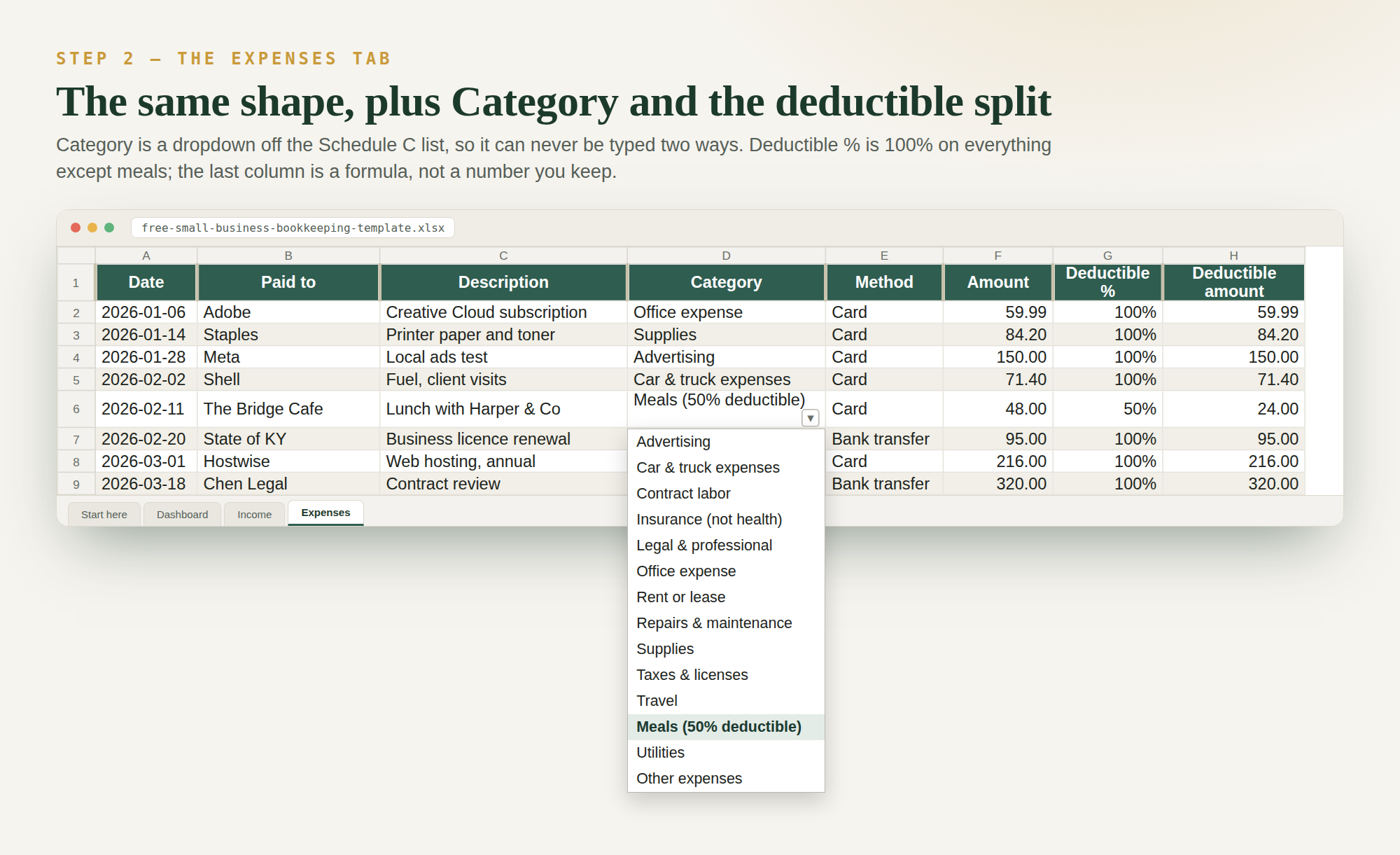
The two features this whole article turns on,
in one screenshot from the real file: a data-validation dropdown (job 4) and an IF formula
splitting a 50%-deductible meal (job 2). Both behave identically in Sheets and Excel.
Which should YOUR business use?
- Freelancer, trades, shop, consultant, side business: Google Sheets. You do tasks 1–6 constantly and 8–11 almost never, and the ledger you would build fills 0.00007% of the cell limit in a year.
- Already fluent in Excel, or your accountant insists: Excel. Fluency in the tool you know is worth more than $99.99 a year, and switching costs real hours.
- Regular bank-CSV imports, or a real financial model: Excel, for Power Query and the pivot engine specifically. Buy the one-time licence if you expect to keep it past two years.
- Not sure: start in Sheets. File → Download → Microsoft Excel exports any time, so the decision is reversible — which makes it a cheap one to get wrong.
The mistakes people actually make
- Paying monthly indefinitely. $19.89 a year, every year, for flexibility most people never use.
- Buying Excel for a job Sheets already does. If your spreadsheet is a tracker, the six functions above are the whole requirement and the subscription buys nothing.
- Choosing on the row limit. It is 1.26×, and 1,389 years away at 50 transactions a month.
- Assuming Sheets cannot open your files. It opens
.xlsxdirectly. The one real gotcha is documented: converting from Excel drops any cell over 50,000 characters — irrelevant for ledgers, worth knowing if you store long notes in cells. - Treating the choice as permanent. Both export to the other. Nobody is locked in, so this is not a decision that deserves a week of research.
- Emailing the file instead of sharing it. The genuine advantage of Sheets is task 5, and it is wasted if you download the file and attach it to a message anyway.
The real answer: you do not have to choose
Because .xlsx opens in Google Sheets and Sheets exports .xlsx, one properly
built template works in both — same tabs, same six functions, same dashboard. That is how every ToolWise
tool ships: one download that opens in free Google Sheets or Excel, plus a free phone-friendly
version. Pick the app; switch whenever you like; rebuild nothing.
Quick FAQ
Is Google Sheets good enough for a small business?
For most, yes. Our own complete bookkeeping system needs six functions, all of which Sheets has, and a twelve-column ledger would take roughly 1,389 years at 50 transactions a month to reach the cell limit. You outgrow Sheets for repeated bank-CSV cleaning, serious financial modelling, or full accounting features like payroll and inventory — not for tracking money.
How much does Excel cost in 2026?
From microsoft.com: Microsoft 365 Personal is $99.99/year or $9.99/month, Family is $129.99/year or $12.99/month, and Office Home 2024 is a one-time $179.99. Paying monthly costs $119.88 a year, $19.89 more than the annual price; the one-time licence breaks even against the subscription at 1.8 years.
Can Excel and Google Sheets open the same file?
Yes. Sheets opens .xlsx, and any Sheet downloads as Excel via File → Download
→ Microsoft Excel. Google documents one conversion limit worth knowing: a cell with more than
50,000 characters is dropped when converting from Excel.
Which handles more data, Excel or Google Sheets?
Excel, but less than people assume. Sheets caps at 10 million cells or 18,278 columns; Excel at 1,048,576 rows by 16,384 columns. On a twelve-column sheet that is 833,333 rows versus 1,048,576 — a 1.26× advantage — and Sheets actually allows 1,894 more columns. Sheets does slow down well before its hard limit, which is the more honest reason to prefer Excel for large tables.
Which is better for doing my taxes?
Either. What matters is that income and expenses are logged and categorised; both export a file your accountant can open. See how to track business expenses for taxes for the method, and how to read a profit and loss statement for reading the result.
Whichever you pick, the setup is the same: start with bookkeeping in Google Sheets, build a full income and expenses spreadsheet, price the work with the profit margin calculator, or start simpler with a monthly budget in Google Sheets.